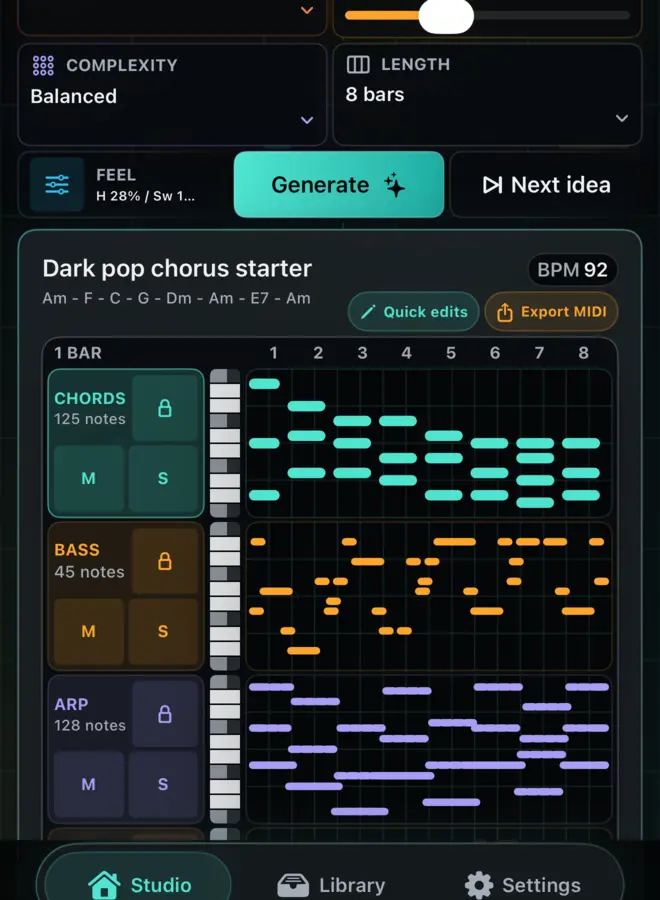
Four-track MIDI starter workflow
MotifPilot turns musical controls into editable chords, bass, arp, and melody MIDI so producers can preview, vary, and export a real DAW starter.
A single chord loop can help, but it rarely feels like a track.
MotifPilot starts from a more useful shape: chords, bass, arp, and melody. Those four lanes give a producer enough relationship to judge whether an idea deserves to move into the DAW.
The workflow is simple: choose the musical frame, generate the four-track starter, preview and shape it, then export editable MIDI into the production tools that finish the song.
Controls are the creative brief
The first screen asks for musical direction, not a paragraph of magic words:
Use producer-facing controls
- style preset
- key and scale
- tempo and bar length
- density and harmonic detail
- swing and humanize
That keeps generation predictable, repeatable, and easy to adjust.
The starter should answer one question
The first question is not "is this a finished song?" It is "is there enough here to keep working?"
That is why 4, 8, and 16 bar starters are useful. They are long enough to test movement, but short enough to rewrite quickly.
Four tracks create context
Give every lane a job
Chords give harmonic gravity. Bass gives movement and weight. Arp gives motion. Melody gives a top-line idea to keep, rewrite, or mute.
The tracks are not meant to be final. They are meant to be useful enough to export and flexible enough to reshape.
Preview and variation happen before commitment
Before exporting, listen to the starter. Focus on a track, mute or solo lanes, and try variation directions such as simpler, darker, jazzier, more emotional, more sparse, more rhythmic, tension, or resolve.
The best variation is not the flashiest one. It is the one that gives you a better decision inside the same musical frame.
MIDI is the trust surface
Keep the idea editable after export
Audio can sound impressive, but MIDI is inspectable. Notes, timing, velocity, voicing, and structure can be changed after export.
That is why MotifPilot treats DAW handoff as part of the core workflow, not a late sharing feature.
The practical producer flow
Use MotifPilot when you need momentum but still want control:
- Set a style preset, key, scale, tempo, bars, density, harmonic detail, humanize, and swing.
- Generate the four-track starter.
- Preview the chord, bass, arp, and melody relationship.
- Push one variation direction if the idea is close.
- Edit notes or replace chords that need steering.
- Export the combined starter, MIDI files for active tracks, plain-text guide, or ZIP package.
- Finish sound choice, arrangement, mix, and release decisions in your DAW.
The app is intentionally focused. It helps you start with editable musical material, then gets out of the way.

How MotifPilot helps
Four related lanes provide enough context to judge the idea.
Studio keeps the musical controls, preview, focused editing, variation, and export path around the same chord, bass, arp, and melody sketch.