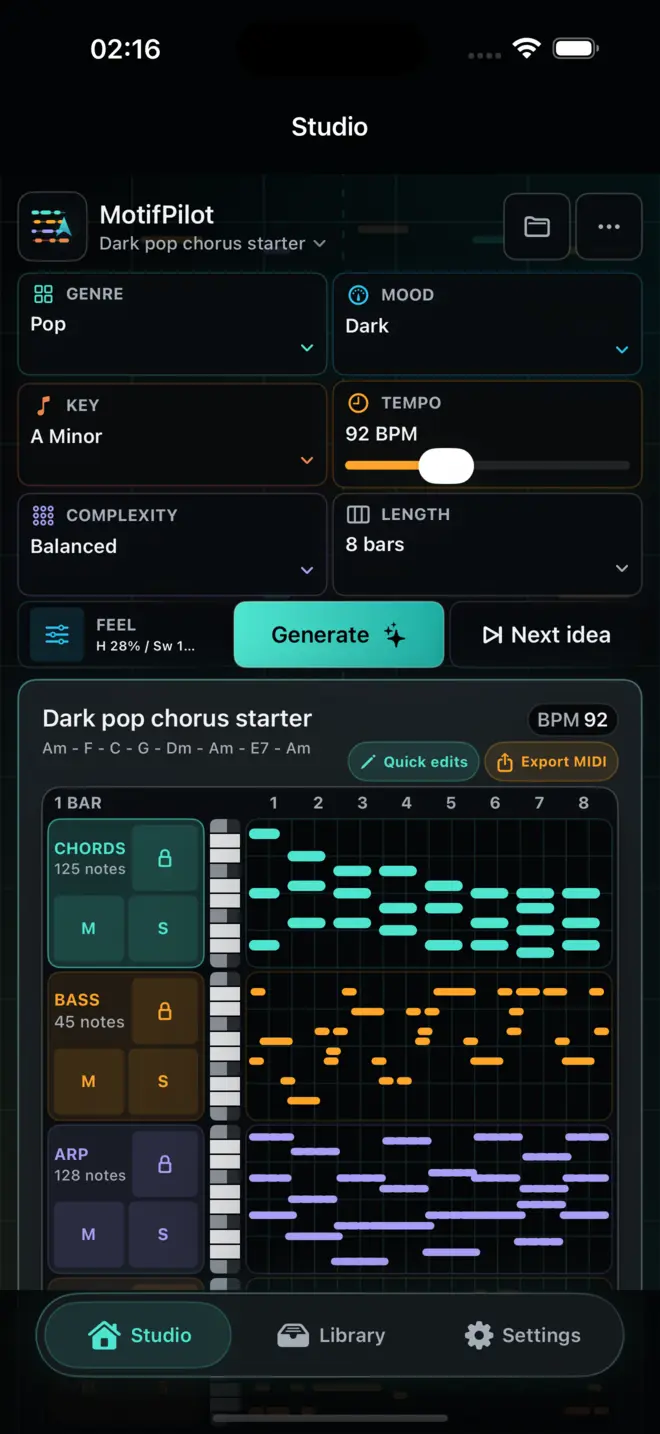
An on-device MIDI generator workflow for iPhone and iPad
Sketch chords, bass, arp and melody with MotifPilot on iPhone or iPad. Preview, edit and export MIDI locally without a MotifPilot account or subscription.
Some guides describe the four-track native workflow at publication. The current Web Studio creates Chords, Bass, Melody and Drums, with independent MIDI/WAV ZIP export. Web and native releases have separate capabilities.
Historical workflow: This article documents the earlier iOS build shown in its screenshots. Check the native feature guide for current release information.
MotifPilot is an on-device MIDI generator for iPhone and iPad. Use it to create related chord, bass, arp and melody parts, preview them, make focused edits, and export editable MIDI for a desktop DAW. The core workflow needs no MotifPilot account, subscription or cloud generation service. The native feature guide and App Store listing identify the product and its released features.
This guide uses the four-part native workflow in the listing reviewed on October 13, 2026. The browser version has a separate four-track engine. Check the current listing when choosing an app version or device.
Start with a musical frame you can judge
When a blank session leaves you choosing sounds instead of writing music, set a short constraint first. For example, choose House, C major, 128 BPM and eight bars. Generate the chord, bass, arp and melody sketch, then listen before adding complexity.
Each part has a different job: chords establish harmony, bass supplies weight and motion, arp adds movement, and melody gives the idea a top line. They are generated in the same musical frame, so you can evaluate their relationship together rather than assemble four unrelated downloads.
Preview and lightly edit before the handoff
Use mute or solo to hear which part helps. Replace a chord if the harmonic direction needs steering. For note-level changes, select a note and adjust its placement, pitch, length or velocity. Transpose and quantize controls can help a focused edit; undo and redo let you compare the result without committing immediately.
The native preview auditions the note events used for MIDI export. Those events remain editable after import, but the sound you hear later depends on the instruments in your DAW. A convincing preview sound should not be mistaken for an included desktop instrument or finished audio file.
Try a direction instead of losing the whole idea
Use a named variation to ask a narrower musical question: could this be simpler, darker, more sparse, more rhythmic, more tense, or more resolved? Listen to the result and undo it if the change does not help. Next idea is the alternative when you want another sketch from the same generation setup.
The controlled MIDI variation guide explains this distinction and the browser’s separate controls. These changes work within MotifPilot’s own sketch; this guide does not promise arbitrary external MIDI import and rewriting.
What works offline, and what still needs a connection?
After installation, generation, preview, editing, project management and MIDI-file creation run on device. There is no MotifPilot sign-in or cloud music-generation step. The app’s core creation workflow does not need an internet connection.
Apple still handles downloading, purchases and updates. Online help and a sharing destination such as a cloud drive can also need a connection. “On device” describes how music work runs; it does not imply every action involving another app or service works without a network.
There is no recurring MotifPilot subscription for the described native workflow. Consult the live App Store purchase details for your storefront’s price. This account boundary concerns a separate MotifPilot service login, not your Apple account.
Save the project, then export the parts
Save the editable sketch in the on-device Library before leaving Studio. Projects and export records have different jobs: a project lets you return to settings and notes, while an export record helps you find files already created. The Library guide covers search, tags, renaming and sharing again.
The native export package can include a combined starter MIDI file, individual MIDI files for active parts, a text import guide and a ZIP. Use the iOS share sheet to save or send the package, then extract it on the destination device. Import the combined file for the whole sketch or place the separate part files on individual DAW tracks at a shared start.
Assign your own instruments, confirm tempo and clip length, and continue arranging in Ableton Live, Logic Pro or FL Studio. The export tutorial and compatibility guide explain the file-format evidence and import checks.
Keep local copies deliberately
The Library is local storage, not automatic cloud backup or synchronization. Export or share copies you want to preserve; projects do not automatically appear in the browser or another device. The native app privacy policy explains on-device music work and user-controlled sharing.
Choose this workflow when you want a short, editable musical starting point before recording, arrangement and mixing. Use a full DAW for those later tasks. For the browser Discover, Studio and Library workflow, read the four-track no-signup browser guide.
Native MIDI sketching
Four related parts, ready for a desktop session.
The published native workflow generates chords, bass, arp and melody on device. Preview and edit the sketch, save it in the local Library, and share editable MIDI.